TB

A friendly programming language for desktop apps, security tools and everything in between.

Plain words and gentle error messages, now with classes, pattern matching, generators and tasks, a formatter, a language server and a VS Code extension, and 44 libraries built in: windows, logs, packet captures, Sigma rules, IOCs, crypto, SQLite, a web server and more.

Version 3.2.0 for Windows, macOS and Linux. What's new in 3.2

import logs

class Suspect {
  fn init(ip) { self.ip = ip; self.tries = 0 }
  fn text() { return f"{self.ip} ({self.tries} failed logins)" }
}

fn failures(records) {
  for r in records {
    if r.action == "failed_login" { yield r.ip }
  }
}

let seen = {}
for ip in failures(logs.read("apps/data/auth.log", "auth")) {
  if ip not in seen { seen[ip] = Suspect(ip) }
  seen[ip].tries += 1
}
for s in seen.values() {
  say(match s.tries {
    0..5 => f"note   {s}"
    5..20 => f"watch  {s}"
    _ => f"block  {s}"
  })
}
Output
$ tb suspects.tb
block  203.0.113.42 (21 failed logins)
note   198.51.100.23 (3 failed logins)

What you can build

The same gentle language builds real tools, and every example on this site is a program you can download and run.

Desktop apps

Windows with buttons, tables, menus and dialogs, from a few lines of TB. They run on Windows, macOS and Linux with nothing else installed.

See it in: To-do list, Care check-in, Notes, Calculator

Desktop code: runs with the TB app, not in the browser.

import gui
import hash

let win = gui.window("Hash checker", {"theme": "dark"})
let result = win.label("Pick a file to fingerprint it.")
win.button("Choose file", fn() {
  let path = gui.open_file()
  if path != nil {
    result.set(hash.file_sha256(path))
  }
}, {"primary": true})
win.run()
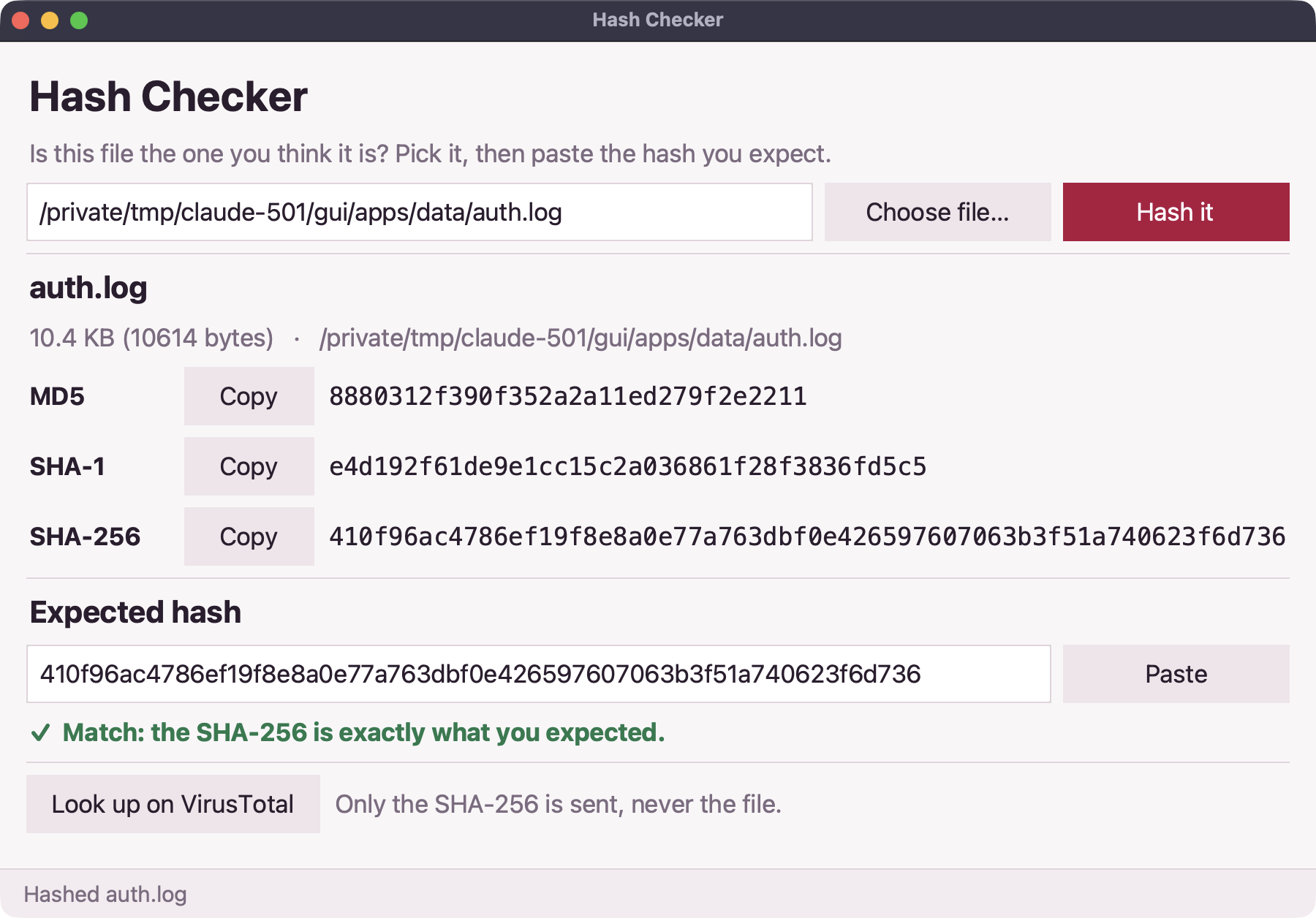
The Hash checker app showing a file's SHA-256

SOC and detection

Parse auth, web, firewall and Windows logs, describe what bad looks like as a rule (or load a Sigma rule), and get a ranked table of alerts.

See it in: Log triage, Brute-force hunter, Sigma runner, IOC workbench

import logs
import detect
import report

let records = logs.read("apps/data/auth.log", "auth")
let alerts = detect.brute_force(records)
say(report.table(alerts, ["level", "rule", "by", "count", "success_user"]))
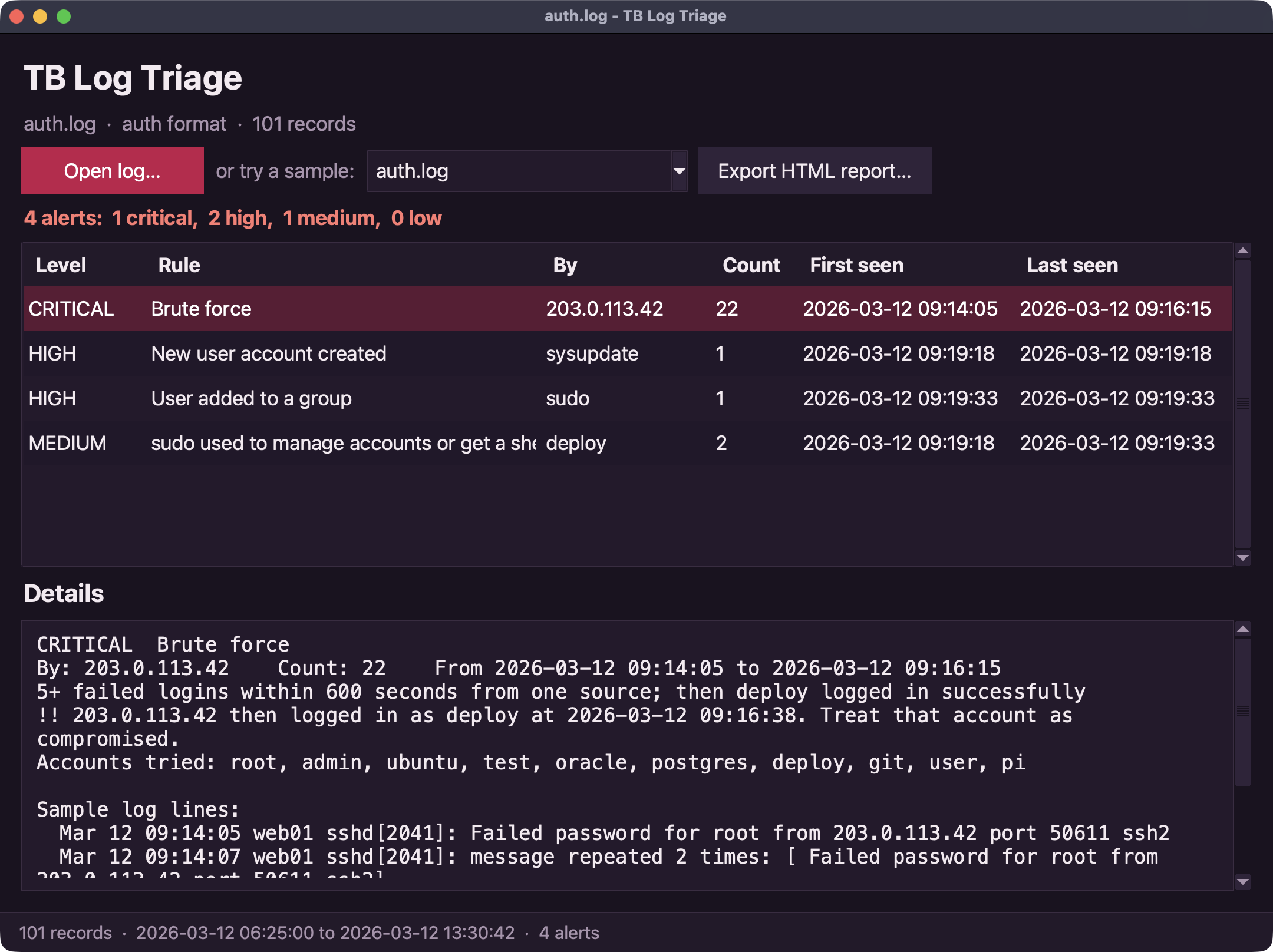
The Log triage app listing alerts from auth.log

Network and intel

Check the ports on machines you own, resolve names, call web APIs, and ask VirusTotal or AbuseIPDB about an indicator.

See it in: Port check, IP reputation, Uptime monitor

Desktop code: runs with the TB app, not in the browser.

import net
import intel

# Only check computers you own or are allowed to test.
let open = net.check_ports("127.0.0.1", [22, 80, 443])
say(open)

if intel.has_key("abuseipdb") {
  let r = intel.abuseipdb("203.0.113.42")
  say(f"{r.verdict} (score {r.score})")
}

Scripts and automation

Read a CSV, reshape it, write JSON. Files, dates, regular expressions and reports are all built in.

import csv
import json

let rows = csv.parse("day,cups\nMon,3\nTue,5\nWed,2")
let total = rows.map(fn(r) { return num(r.cups) }).sum()
let top = rows.sort_by(fn(r) { return num(r.cups) }).last()
say(f"{total} cups of tea, most on {top.day}")
say(json.stringify({"total": total, "top": top.day}))

New in TB 3.0

The language grew the features you reach for in bigger programs, and kept its plain words and friendly errors. Every 2.x program still runs. See everything that's new.

Classes and enums

Describe your own kinds of things with fields, methods and inheritance.

enum Level { low, high }

class Alert {
  fn init(rule, level) {
    self.rule = rule
    self.level = level
  }
  fn text() { return f"[{self.level.name}] {self.rule}" }
}

say(Alert("ssh brute force", Level.high))

Pattern matching

match picks the first pattern that fits: values, ranges, lists, maps, types and classes.

fn triage(event) {
  return match event {
    {"tries": n} if n > 10 => "block the IP"
    {"port": 22 or 3389} => "check remote access"
    [first, ...rest] => f"{len(rest) + 1} events"
    _ => "log it"
  }
}
say(triage({"ip": "203.0.113.42", "tries": 22}))
say(triage({"port": 3389}))

Generators

yield hands out values one at a time, so a pipeline only does the work you ask for.

fn evens() {
  let n = 0
  while true {
    yield n
    n += 2
  }
}
say(evens().map(n => n * n).take(5).to_list())

Tasks with async and await

Start slow work at the same time and collect the answers; parallel spreads it over threads.

async fn check(host) {
  return f"{host}: ok"
}

let tasks = ["web01", "web02", "db01"].map(check)
for t in tasks {
  say(await t)
}

Also new: destructuring and spread, default and named arguments, lambdas, const, bytes, ranges and slices, number formats in f-strings, typed errors with finally, defer and assert, modules with export, and packages. Each has a lesson in the guide.

Batteries included

44 libraries ship inside the TB app, from text and dates to packet captures, Windows event logs, executables, Sigma rules and a web server. Write import pcap and go.

Browse the library reference, with every function and an example for each library.

Tools that come with it

Everything a bigger project needs is one tb command away, and the VS Code extension puts it in your editor.

Format, check, test

tb fmt lays code out the same way every time, tb check finds mistakes before you run (with optional type hints), and tb test --coverage runs your tests and shows which lines they reached.

> tb fmt --check .
> tb check main.tb
> tb test --coverage

Debug and build

tb debug steps through a program with breakpoints and shows every variable; tb build packs an app into a folder you can hand to someone without TB.

> tb debug main.tb
> tb build apps/todo/main.tb

Packages

tb init starts a project, tb add installs a package and pins it in tb.lock. Browse the packages.

> tb init
> tb add tb-tables

VS Code extension

Highlighting, completion, hover help, errors as you type, go to definition, formatting and Run buttons, from tb lsp. Install it from the download.

tb-vscode-3.2.0.vsix

See every tool, with examples.

Still gentle

TB is designed for people who have never programmed, and it stays that way when the programs get bigger.

Friendly errors

Every mistake names the line and says what went wrong, in plain English. Typos get a suggestion.

let name = "Tanisha"
let greeting = "Hello"
say(greeting + ", " + nmae)
Oops! On line 3: I don't know what 'nmae' is. Did you mean 'name'?

One download, no setup

The Windows installer needs no admin rights and brings the whole standard library and the apps with it. Then just double-click a .tb file to run it.

> tb --version
TB 3.2.0

Runs everywhere

The same program runs on a Windows laptop, a Mac, Linux, or right here in the browser (everything except windows and the network).

  • Windowsinstaller or zip
  • macOSApple silicon
  • Linuxx64
  • BrowserPlayground

Built-in kindness

care() prints a kind message, chosen at random. Give it a name to make it personal. It's still there in 3.0.

care("Tanisha")
♥ Tanisha, one step at a time is still progress.

A quick tour

Nine short programs cover most of the language. Press Run on any of them.

Put any expression inside { } in an f"..." string. Text has methods you call with a dot.

let name = "Tanisha"
let mood = "  sunny  "
say(f"Hello, {name}! Today feels {mood.trim()}.")
say(name.upper(), name.len(), name.contains("le"))
say("a,b,c".split(","))

Read the full guide, from your first say to classes, generators and tasks, then try the tutorials.

Install

On Windows, run the installer; on a Mac or Linux, unzip one folder. The standard library and the apps come inside, and the download page walks through every click.

# After tb-windows-x64-setup.exe, open TB Prompt:
> tb --version
TB 3.2.0
> tb hello.tb
Hello, world!
# Or double-click any .tb file.

Why TB?

TB is a small language with a few firm design goals.

It starts gentle, so learning it never feels like being told off, and it grows into real work: a to-do app, a log triage tool or a quick script.

  • Friendly errors

    Every mistake names the line and says what went wrong in plain English, with a suggestion when it looks like a typo.

  • Batteries included

    44 libraries ship with the language: windows and buttons, files and data formats, logs, detection rules, hashing, crypto and networking. Packages add more when you need them.

  • Runs everywhere

    The same program runs on Windows, macOS and Linux, and in the browser playground.

  • Small and readable

    Plain words like say, let and for, and a syntax small enough to learn in an afternoon.

Write your first program tonight

The guide starts from zero; the tutorials end with a desktop app and a real investigation.